Professional Printing Brand Logo in Minutes with AI🔥
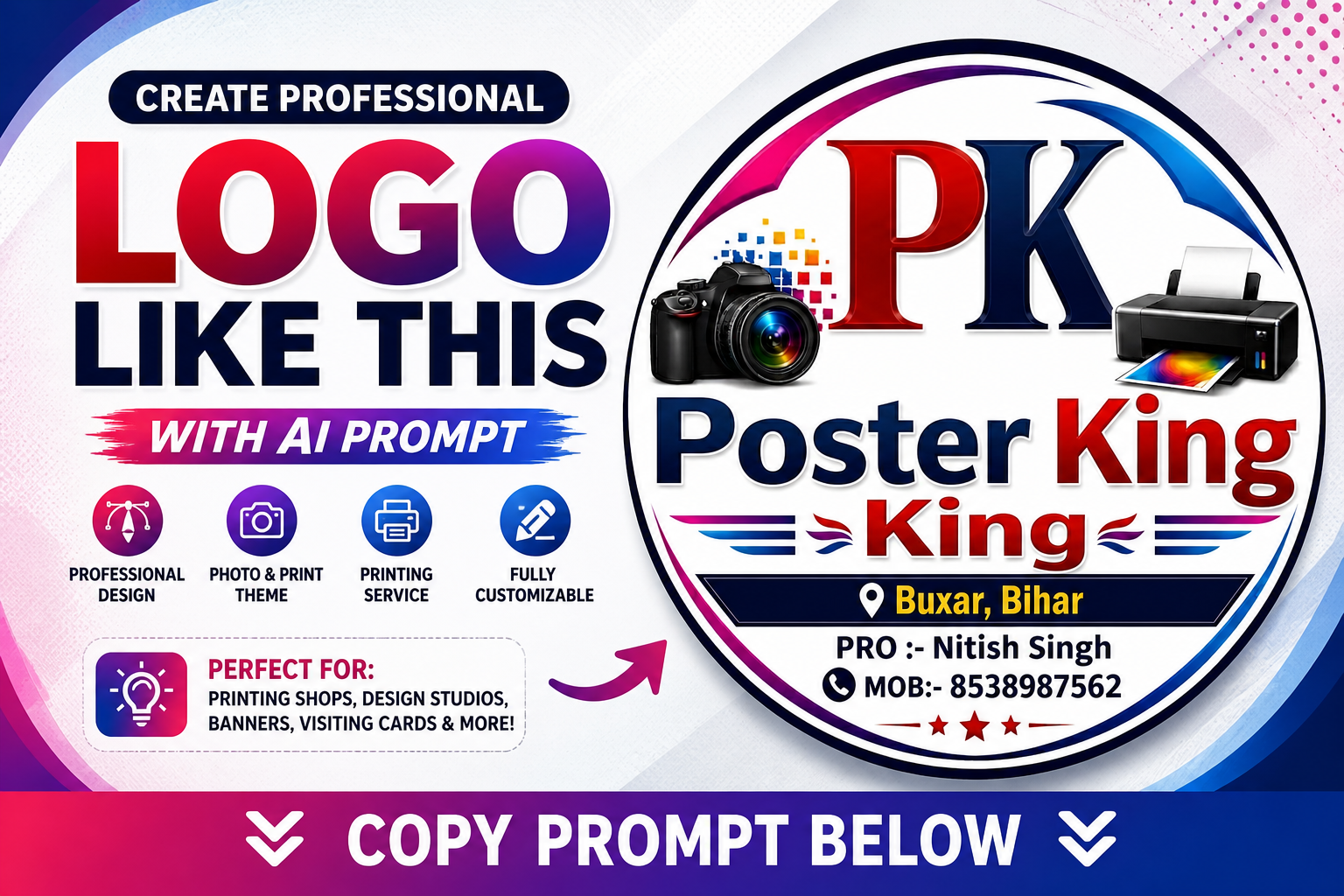
If you’re looking for a modern, eye-catching logo design for your printing or creative business, this Poster King (PK) logo is a perfect example of powerful branding.
This design combines photography, digital creativity, and printing services into a single, clean circular badge. With bold typography, vibrant gradients, and realistic elements like a DSLR camera and printer, it creates a strong visual identity that instantly grabs attention.
Whether you run a printing shop, graphic design studio, or digital service business, this style of logo helps build trust and gives your brand a professional look.
✨ Key Features of This Logo Design:
- 🔴 Bold 3D-style PK initials for strong branding
- 🔵 Clean and modern typography layout
- 📸 Realistic DSLR camera element (symbol of creativity)
- 🖨️ High-quality printer graphic (represents printing services)
- 🌈 Colorful gradient circular border for premium feel
- 📍 Location + contact details integration
- 💎 Glossy, ultra-HD, professional finish
🚀 Where You Can Use This Design:
- Printing shop branding
- Visiting cards & business cards
- Shop boards & banners
- Social media profiles
- Website branding
- Poster & flex design businesses
🧠 How to Use This Prompt:
- Copy the prompt below
- Paste it into any AI image generator (like Midjourney, DALL·E, Leonardo, etc.)
- Generate your logo
- Customize text (name, number, location) as per your business
📋 Prompt (Click to Copy)
On the left side, include a realistic DSLR camera with a colorful lens effect, symbolizing photography and design. On the right side, include a high-quality printer printing a vibrant color image. Add small colorful pixel elements near the camera to represent digital creativity.
The logo has a circular badge layout with a smooth gradient border in pink, purple, and blue tones. At the bottom, include a location tag “Buxar, Bihar”, and below that, text: “PRO: Nitish Singh” and “MOB: 8538987562” with small icons.
Use clean, sharp details, glossy effects, modern gradients, and a white or transparent background. Ultra HD, 4K quality, highly detailed, professional branding style.
🚀 Google Gemini से कैसे बनाएं
🔹 Step 1: Gemini Open करो
- Browser में जाओ
- 👉 https://gemini.google.com खोलो
- अपने Google account से login करो
🔹 Step 2: Image Generation Mode Use करो
- Chat box में direct prompt paste कर सकते हो
- अगर option दिखे तो “Create Image” / “Generate Image” select करो
🔹 Step 3: Prompt Paste करो
तुम्हारा जो prompt मैंने दिया था 👇
उसे copy करके Gemini में paste कर दो
👉 (Tip: prompt के start में ये add करो)
“Create a high-quality logo image:”
इससे Gemini clearly समझेगा कि image बनानी है
🔹 Step 4: Generate करो
- Enter दबाओ
- 5–10 सेकंड में logo generate हो जाएगा
🔹 Step 5: Best Version Select करो
- जो design अच्छा लगे उसे download करो
- अगर perfect नहीं आया तो prompt में थोड़ा change करो जैसे:
- “minimal”
- “vector style”
- “clean background”
- “no text errors”
👉 Free me itna powerful prompt mil raha hai — is post ko save aur share karna mat bhooliye!
Need premium editable design files?
Explore our latest CDR, PSD, fonts and ready-to-edit design collections.
Explore Products →
Comments
अपनी राय लिखें. Submit करने के लिए account login जरूरी है.