
Thoughtful Pose Photo PROMPT – Realistic Images Kaise Generate Karein: Step-by-Step Guide
Aaj ke time me ChatGPT (DALL-E 3), Google Gemini, Midjourney ya kisi bhi AI tool se high-quality aur realistic images banana behad aasan ho gaya hai. Bas zaroorat hoti hai sahi prompt technique aur clear instructions ki.
Step 1: Sahi AI Tool Ka Chunav Karein
-
Google Gemini / ChatGPT Plus: Text-to-image generation ke sath direct photo upload karke reference image edit karne ke liye behtareen hain.
-
Midjourney / Stable Diffusion: Hyper-realistic aur cinematic textures ke advanced control ke liye best hain.
Step 2: Reference Image Upload Karein (Agar Face Match Karna Ho) Agar aap kisi specific photo jaisa face chahte hain:
-
Chat interface me Attach / Upload (+) icon par click karein.
-
Clear aur acchi lighting wali photo upload karein jisme face details saaf dikh rahi hon.
Step 3: Ek Strong Prompt Structure Taiyar Karein Kisi bhi AI ko accurate output dene ke liye prompt ko 5 hisso me bantiye:
-
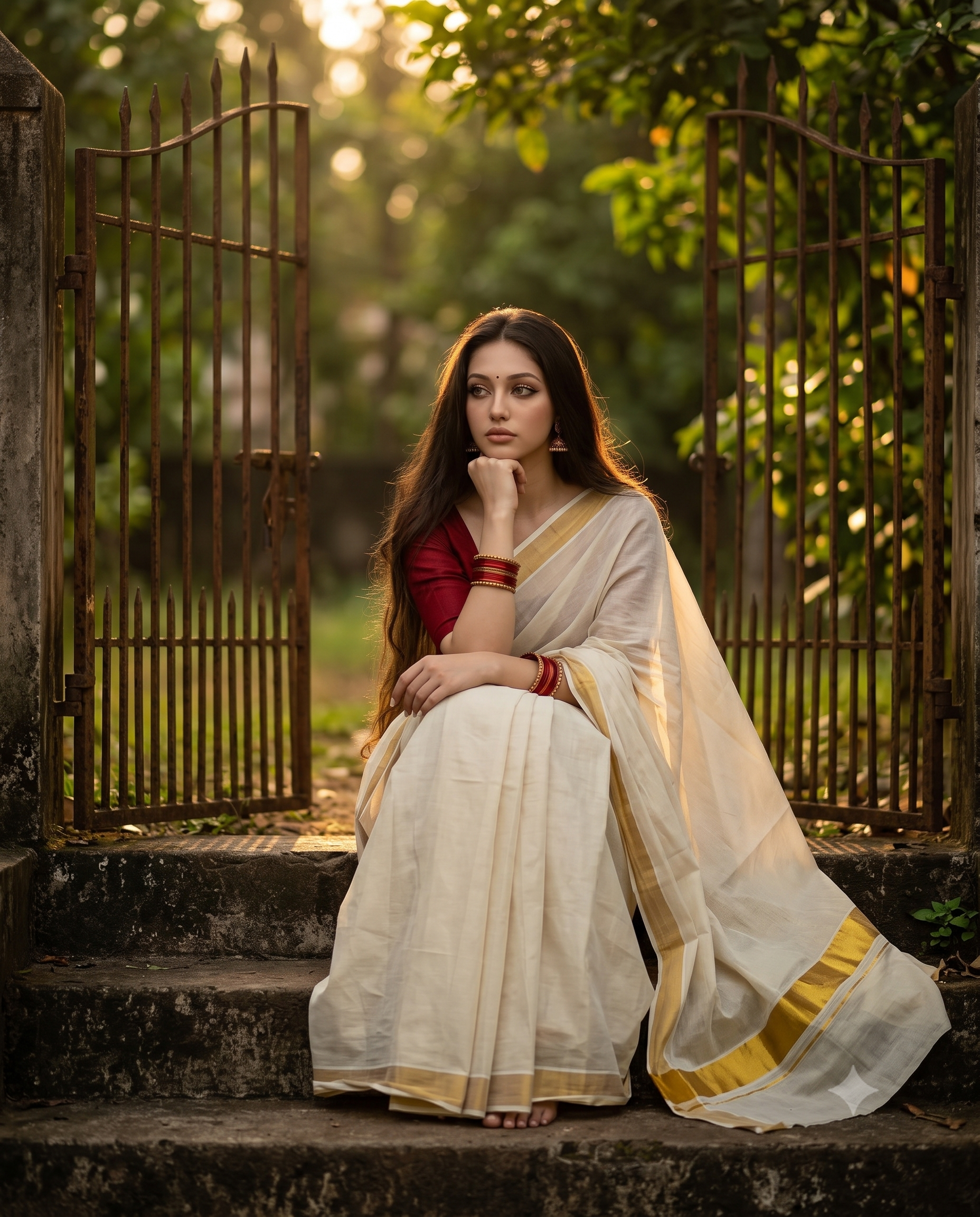
Subject Details: Subject kya hai, unka pose, expressions aur face match ka instruction (e.g., Maintain the face same as the uploaded photo, resting chin on hand).
-
Clothing & Styling: Kapdo ka color, pattern aur traditional/modern style (e.g., traditional Kerala Kasavu saree with red blouse and bangles).
-
Environment & Background: Location, background elements aur atmosphere (e.g., concrete steps next to an old rustic gate, lush green trees).
-
Lighting & Mood: Light ka angle aur feel (e.g., golden hour sunlight, warm moody glow, dramatic shadows).
-
Camera & Technical Specs: Shot type aur aspect ratio (e.g., telephoto lens, shallow depth of field, soft bokeh, aspect ratio 4:5).
Step 4: Prompt Enter Karein Aur Generate Par Click Karein
Generate a cinematic, realistic portrait of the uploaded beautiful woman sitting thoughtfully on concrete steps next to an old open gate. She is wearing a traditional Indian white and gold-bordered Kerala saree paired with a rich red blouse, bangles, earrings. Her long, dark wavy hair flows loosely, and she rests her chin on her hand with a contemplative expression. Natural golden hour sunlight filters through the surrounding green trees, creating a warm, moody glow with a soft, bokeh background. Shot on a telephoto lens, shallow depth of field, dramatic shadows, authentic cultural aesthetic. Maintain the face same as the uploaded photo. Aspect ratio 4:5.
Step 5: Image Ko Fine-Tune Aur Refine Karein
-
Agar lighting ya color thoda alag lage, toh usi chat me feedback dein (jaise: “Make the background blur softer” ya “Increase the warm sunlight”).
-
Pasand aane par image par right-click / long-press karke high resolution me download kar lein.
Agar yeh guide aapke liye useful lagi ho, toh apne dosto aur creators ke sath zaroor share karein!
Need premium editable design files?
Explore our latest CDR, PSD, fonts and ready-to-edit design collections.
Explore Products →




Comments
अपनी राय लिखें. Submit करने के लिए account login जरूरी है.